LQIPs (Low Quality Image Previews)
Low-quality image previews (LQIPs) provide a compact placeholder while a full image downloads. Konifer can generate two types:
- BlurHash: Encodes a blurred color approximation as a short string
- ThumbHash: Encodes color, aspect ratio, and optional transparency in a compact binary value
You can enable either format or both.
Note: Use a BlurHash or ThumbHash decoder in your application to render the placeholder. The projects linked above provide format details and implementation libraries.
Konifer creates LQIPs with eager and on-demand variants. It regenerates a preview only when a transformation changes the
image data used by the preview. For example, a blur transformation reuses the existing LQIP.
Preview Example
These previews decode the hashes Konifer returned for the same cow photo. Compare the broad areas of sky, trees, and grass with the finished image. A preview gives the page some of the image's color and structure while the image loads.
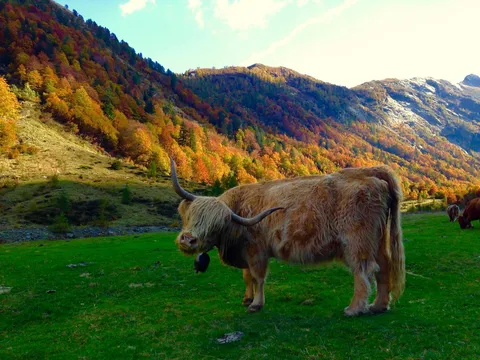


All three occupy the same 4:3 display area. The previews above are saved PNG renderings of the returned hashes; your application would decode the hashes into placeholders, then replace them with the finished image.
The following request returns a link response containing the variant's attributes and LQIPs:
GET /assets/documentation/lqip/cow/-/link?format=webp&width=480
This excerpt contains the actual hashes used above:
{
  "attributes": { "height": 360, "width": 480, "format": "webp" },
  "lqip": {
    "blurhash": "UnEyk|IUV@ni~qIUV@jF.8M|RQWB%gNIM|V[",
    "thumbhash": "1ugVFYh1d4hfd4d6d5dniayTcOcJ"
  }
}
Konifer returns BlurHash as a string and ThumbHash as Base64. Decode the ThumbHash string to bytes before passing it to a ThumbHash decoder. In this example, the BlurHash contains 36 characters and the ThumbHash contains 21 bytes before Base64 encoding. The sizes of the PNG illustrations do not represent the hash payload sizes.
Usage
LQIPs are disabled by default. Enable both formats for a path with this configuration:
paths {
  "/documentation/lqip/**" {
    lqip = [
      blurhash,
      thumbhash
    ]
  }
}
To reproduce the example, download the cow photo, save it as
cow-original.jpg, and upload it after applying the configuration above:
curl --fail-with-body \
  --request POST \
  'http://localhost:8080/assets/documentation/lqip/cow' \
  --form 'metadata={}' \
  --form 'asset=@cow-original.jpg'
To disable inherited LQIPs for a child path, set lqip to an empty array:
paths {
  "/**" {
    lqip = [
      blurhash,
      thumbhash
    ]
  }
  "/users" {
    lqip = []
  }
}